
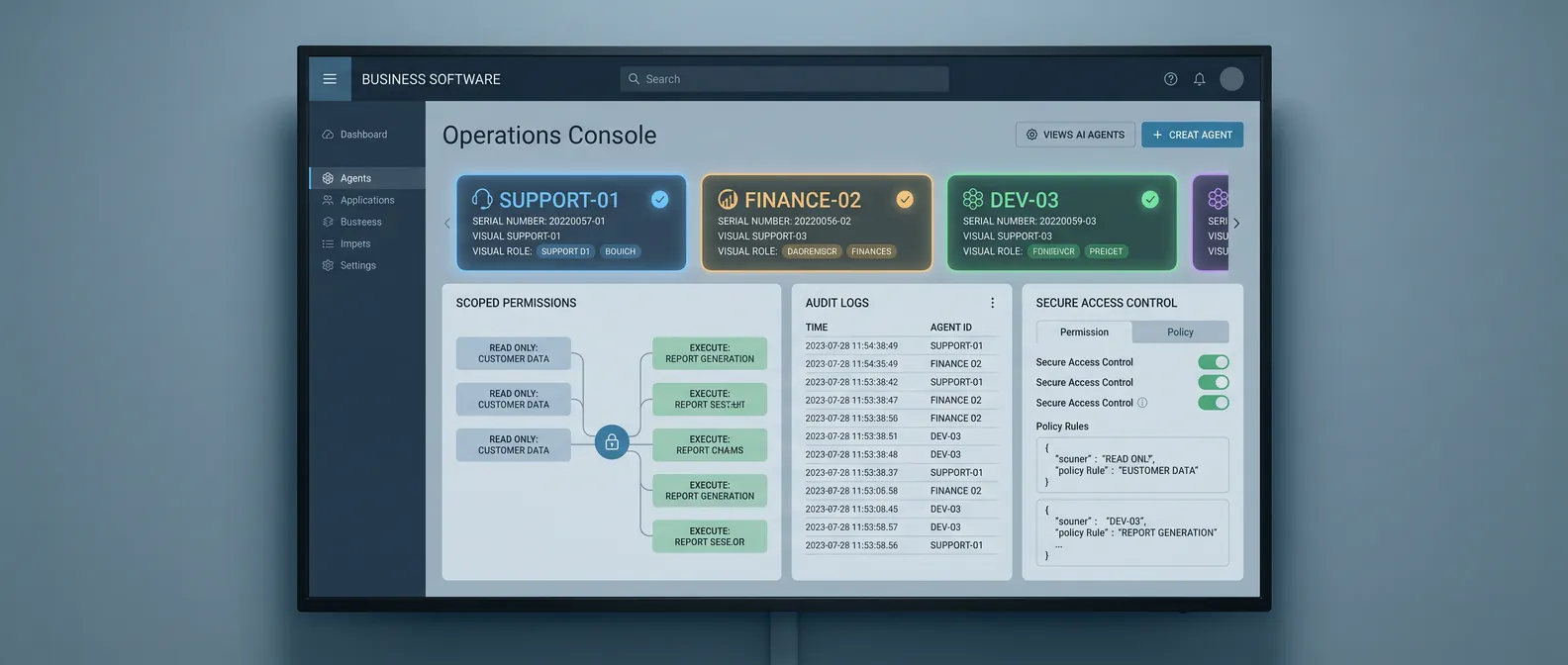
Most AI agent risk starts with a sentence that sounds harmless:
"We'll just let it use the team login."
That may work for a demo. It is a bad production plan.
If an AI agent can read customer records, update tickets, create tasks, trigger workflows, or send messages, it is no longer just a model answering prompts. It is an actor inside your company. Actors need identities.
That sounds like security plumbing. It is really an operating decision. Without a real identity, you cannot tell what the agent did, what a human did, which permissions were too broad, or what needs to be revoked when something goes wrong.
The market is moving in this direction. NIST's AI Agent Standards Initiative is focused on secure adoption, including agent identity, authorization, security evaluation, and interoperability. Anthropic's recent work on trustworthy agents breaks the system into the model, harness, tools, and environment, which is a useful way to think about where control actually lives. OpenAI's enterprise AI updates point in the same direction: agents need business context, connected systems, permissions, and controls before they can run real workflows.
For founders, the lesson is simple.
Do not treat agent access as an implementation detail. Design it before the agent touches production.
Shared logins hide the thing you need to see
A shared login makes the first demo easier because nobody has to think about permissions yet. The agent can get into the CRM, ticketing system, email account, document store, or internal app using credentials that already exist.
That shortcut creates a visibility problem.
When something changes in the system of record, who changed it? Was it the agent, an employee, an automation rule, or an integration? If the agent made the change, which run caused it? Which input did it receive? Which tool did it call? Which policy did it apply?
If the answer is "the shared ops account did it," the business has lost the trail.
That is not a compliance footnote. It affects everyday operations. When a customer record is wrong, support needs to know why. When a workflow stalls, the owner needs to know where. When a risky action slips through, engineering needs to know which permission, prompt, tool, or approval path failed.
Shared logins collapse those questions into one muddy event stream.
Give the agent a named identity
The first fix is basic: give the agent its own identity.
That identity should be visible in the systems it uses. If the agent creates a task, the task should say the agent created it. If it updates a ticket, the ticket history should show that. If it drafts a customer message for review, the review queue should distinguish agent output from human output.
This does not need to be elaborate in version one. The point is accountability.
Start with a simple convention:
- One identity per production agent
- A clear owner for that identity
- Separate access for development, staging, and production
- No shared human credentials
- Logs that connect each action back to a specific agent run
That last item matters. A named account is useful, but it is not enough by itself. You also need to connect system actions to the run that produced them.
For example, if an onboarding agent updates an account status, the trace should tell you the input ticket, records inspected, decision made, tool call used, output produced, and human approval if there was one.
That is how you turn "the AI changed it" into a debuggable system.
Scope permissions by verb
Most teams talk about agent access too broadly.
"It has CRM access."
"It can use Slack."
"It can work in Zendesk."
That language hides the risk. Production permissions should be written as verbs.
Can the agent read a customer record? Can it add an internal note? Can it change lifecycle stage? Can it assign an owner? Can it send a customer-facing message? Can it approve a refund? Can it delete a file?
Those are different actions. They should not all sit behind the same vague permission.
For a first production agent, the safe pattern is usually:
- Read approved records
- Classify or summarize work
- Draft a next action
- Create internal tasks
- Add internal notes
- Escalate exceptions with context
Higher-risk actions should require review until the workflow earns more autonomy. Sending external messages, changing revenue-impacting fields, issuing credits, modifying permissions, or publishing content should not be bundled into the first broad grant of access.
This is not about slowing the team down. It is about making autonomy expandable.
When the agent performs well, you can add the next verb. When it fails, you can remove one permission without shutting down the whole workflow.
Build revocation into the plan
Every agent access plan needs a kill switch.
Not a dramatic one. A practical one.
Who can pause the agent? Who can revoke its credentials? What systems does that affect? What happens to in-flight work? How does the team know whether the agent left partial updates behind?
If those questions are unanswered, the agent is not ready for production access.
Revocation is easy to ignore when the team is excited about the demo. But production incidents are usually boring and specific. A policy changed. A source field became unreliable. A tool returned a weird response. A prompt injection got through. A customer request fell outside the expected path.
In those moments, the business needs a clean way to stop the agent, preserve the traces, route the remaining work to a human, and fix the boundary that failed.
That is much easier when the agent has its own identity and scoped permissions.
Audit trails are product features now
Agent vendors and automation platforms are starting to treat traces, guardrails, retention windows, and policy controls as normal parts of the stack. UiPath's recent AI Trust Layer updates are a good example. The details are technical, but the business signal is plain: production teams want to see what agents are doing and control how long that evidence stays available.
Founders should take the same stance, even if the first workflow is small.
For every production run, capture enough information for a human to answer:
- What work item started the run?
- What data did the agent inspect?
- What tools did it call?
- What did it decide?
- What did it change?
- What required approval?
- Who approved it?
- What happened after the change?
You do not need a giant observability platform on day one. A readable trace connected to the agent identity is a good start.
The goal is not perfect surveillance. The goal is operational memory. When the workflow improves, the team should know why. When it breaks, the team should know where to look.
The practical checklist
Before your first production AI agent gets access to business systems, answer these questions:
- What is the agent's name in each system it uses?
- Who owns that agent?
- What can it read?
- What can it write?
- Which actions require human approval?
- Which systems are off limits?
- How are development and production credentials separated?
- How does each action connect back to an agent run?
- Where are traces stored?
- How long are traces retained?
- Who can pause or revoke access?
- What happens to in-flight work if access is revoked?
If the team cannot answer those questions, the project is still in demo mode.
That is fine. Demos are useful. They help prove the workflow has value.
But production is different. Once an agent can act inside the business, it needs the same basic discipline you would expect from any other software user with system access.
Give it an identity. Scope its permissions. Log what it does. Make revocation boring.
That is how AI agents become part of the operating system without becoming a mystery employee.
If you are moving an AI workflow from demo to production and want a practical second opinion, book a discovery call: https://calendly.com/martintechlabs/discovery
Sources
- NIST: AI Agent Standards Initiative
- NIST: CAISI AI agent standards listening session
- Anthropic: Building trustworthy agents
- OpenAI: The next phase of enterprise AI
- UiPath: Agents release notes, March 2026
FAQ
Why should an AI agent have its own identity?
An AI agent should have its own identity so the business can see which actions came from the agent, connect those actions to a specific run, scope permissions cleanly, and revoke access without disrupting human users.
What is wrong with giving an AI agent a shared login?
A shared login hides accountability. If a record changes, the team cannot reliably tell whether the agent, a human, or another automation made the change. That makes debugging, auditing, and revocation harder.
What permissions should a first production AI agent have?
Most first production agents should start with narrow permissions: read approved records, classify work, draft next steps, create internal tasks, add internal notes, and escalate exceptions. Riskier actions should require human approval.
How do you make an AI agent easier to shut off?
Use a dedicated identity, scoped credentials, clear ownership, readable traces, and a documented pause or revocation path. The team should know who can stop the agent and what happens to work already in progress.