
Most companies come into an AI Automation Audit expecting us to hand them a vision. A before-and-after story. Here is your business transformed by artificial intelligence.
That is not what an audit is for.
What we actually do in a week is much more specific and, for most clients, much more valuable. We find the two or three places where automation will have the highest impact and explain, in plain terms, what it would take to build each one.
Here is what that looks like in practice.
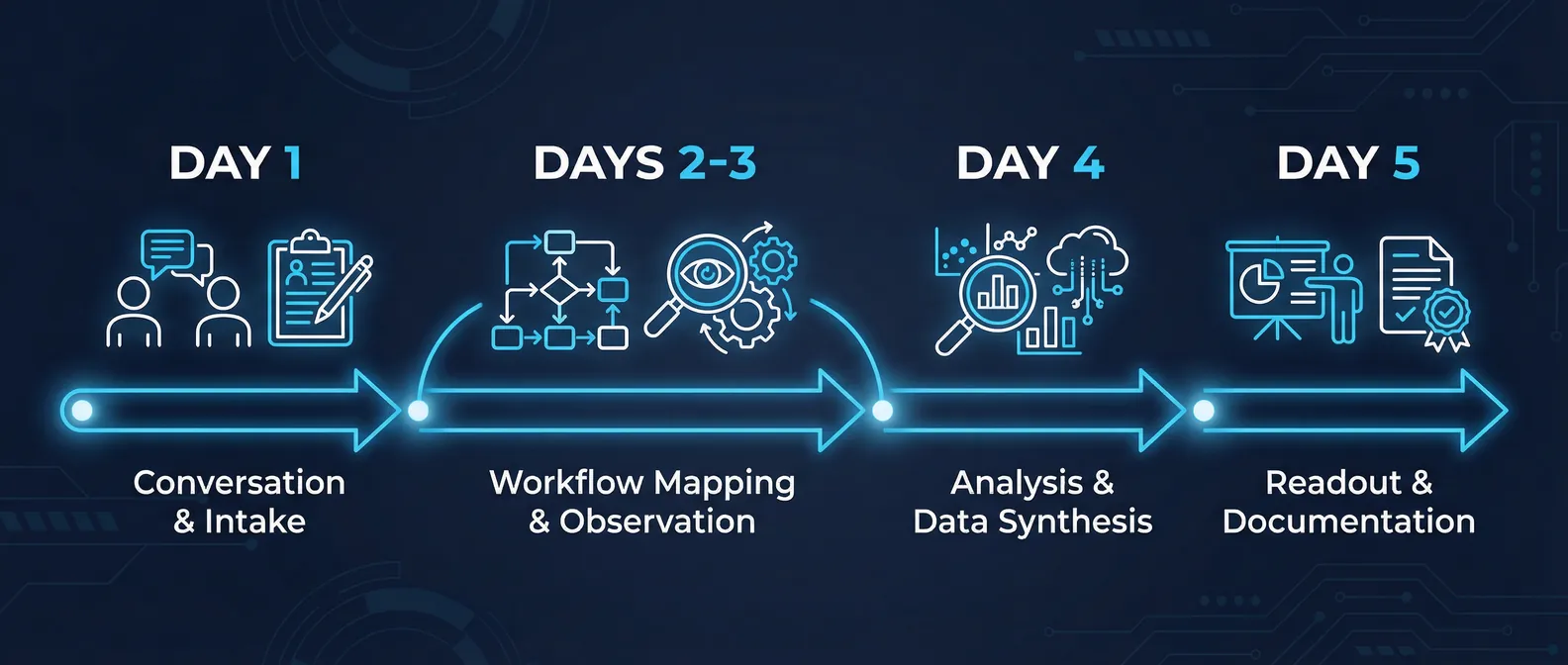
What happens during the week
An audit is not an assessment. We are not showing up to produce a report. The week is structured around conversations with the people who actually do the work, not the people who manage it.
Day one is typically intake: understanding the business model, where revenue comes from, where the most time is spent, and what problems the leadership team has been trying to solve. We ask about what has been tried before, what got abandoned, and why.
Days two and three go deeper. We map the actual workflows, usually by watching people do the work rather than asking them to describe it. What you see when you observe a process is almost always different from what someone tells you the process is. The manual steps that take 20 minutes and are not on any official checklist. The spreadsheet that lives in one person's Downloads folder and is critical to two teams. The approval chain that has six steps when the documentation says three.
Day four is analysis. We take what we have seen and ask: where is the time going, where are the errors concentrated, and where would a system handle this better than a person?
Day five is the readout. A prioritized list of opportunities with rough effort estimates and honest assessments of risk. Not slides with arrows pointing to the future. A document you can take to your engineering team or use to scope a build.
What companies actually find
The honest answer is that almost every business we have audited had the same kinds of findings, even when the industries were different.
Manual data transfer between systems. This is the most common finding. Someone is taking data from one tool and entering it into another. Sometimes this is an export and an import. Sometimes it is someone reading one screen and typing into another. The work is not complicated. It is just being done by a human who could be doing something else. This is almost always the first thing we build, because the impact is immediate and the risk is low.
Status updates and approval routing. The second most common finding is a workflow where something needs to go to a person for review, and the routing of that thing is done manually. Someone sends an email. Someone follows up. Someone checks a spreadsheet to see whether something has been approved. A well-designed system can handle all of this, notify the right people at the right times, and create an audit trail without anyone having to chase anyone.
Document processing. Companies that handle a lot of documents, which is most companies, are often processing them by hand in ways that could be automated. Contract review, invoice processing, compliance checking, application screening. The AI is not making the final call on anything sensitive. It is doing the preliminary extraction, classification, or flagging so that a person can review what matters instead of reviewing everything.
Reporting that no one reads. We usually find at least one report that takes hours to produce and is used by fewer people than the team assumes. This is not a place to automate. It is a place to stop. We flag these too.
What companies do not find
Here is what never shows up in an audit: one massive transformation that solves everything.
The companies that spend six months planning a single comprehensive AI system and then try to build it in one sprint almost always run into trouble. The scope is wrong. The data is messier than expected. The integration with the existing system turns out to require six additional pieces that were not in the plan.
The better approach, and the one we recommend, is to build the highest-impact thing first. Get it into production. Learn from it. Then decide what comes next.
The audit is not the answer to everything. It is the map that tells you where to start.
How to prioritize what you find
Every finding in the audit readout includes three things: the estimated time savings, the rough engineering effort to build it, and our honest read on the complexity of the data or systems involved.
The highest-priority items are the ones where the time savings are large, the build is relatively contained, and the data is relatively clean. These are the ones that tend to pay for the audit itself in the first month of operation.
The lower-priority items are usually things that would have significant impact but require some foundation to be in place first. Messy data that needs to be cleaned before it can be used. A system that needs an API that does not exist yet. A workflow that requires more stakeholder coordination than a single team can manage.
We do not recommend building everything on the list. We recommend building the first thing well.
What comes after the audit
Some clients take the readout and hand it to an internal team. Some come back to us for a build sprint. Some use it to evaluate other vendors. We have designed the output to be useful regardless of what the client decides next.
The most common outcome is a four to eight week build sprint focused on the highest-priority item. By the end of that sprint, there is a working system in production. Not a demo. Not a prototype. Something the team uses every day.
The audit scope varies based on your business and the number of workflows we need to map. Most clients recover the investment in the first quarter after the build.
If you have been wondering where AI actually fits in your operation, the audit is the fastest way to find out without committing to a build.
Book a 30-minute discovery call to find out if an audit is the right starting point