
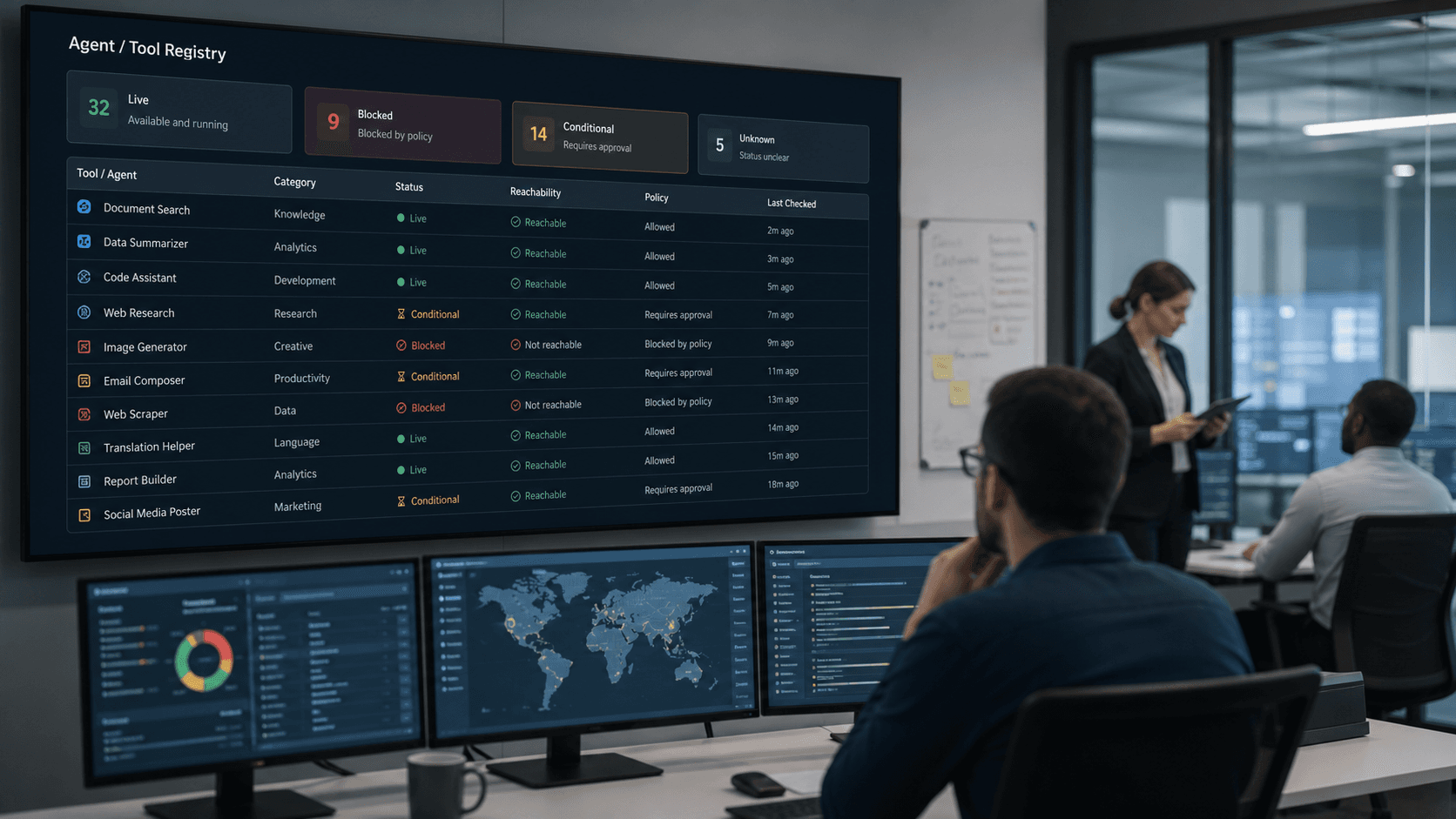
Most teams still treat the agent registry like a nicer spreadsheet.
There is an agent. There is a connector. There is an MCP server. There is an owner.
That is useful. It is not enough.
Once AI workflows touch live systems, the registry has to answer a harder question. What can this workflow actually reach right now under the current policy state.
That is the difference between an inventory and an operating surface.
A static catalog does not tell the operator enough
A tool can stay listed long after it stops being reachable in practice.
Maybe gateway policy blocks it. Maybe access is only open during a narrow exception window. Maybe one workflow has scoped approval and another does not. Maybe egress is denied until a reviewer signs off.
If the registry still shows the tool as if it is simply "available," the business has not really solved the governance problem. It has just moved the confusion somewhere else.
Operators still have to ask around. Reviewers still have to open multiple admin views. Incident response still starts with reconstruction instead of explanation.
I would not call that production-ready visibility.
The market is moving toward live control surfaces
The recent enterprise AI platform updates all point in the same direction.
Google keeps making registry, gateway, observability, and governance part of one operating layer. Microsoft keeps turning MCP management, scoped permissions, and trace visibility into an admin responsibility, not a side feature. OpenAI keeps making agent actions, approvals, and workspace visibility more concrete for operators.
Different vendors, same message.
The question is no longer just whether a workflow can use tools. The question is whether the business can see the current authority boundary around those tools without guessing.
That is why the registry matters more than it used to.
"Exists" and "reachable" are not the same thing
This is where a lot of teams get tripped up.
They build a trustworthy inventory of agents and connected systems, then assume the job is mostly done.
It is not.
For production AI, there are at least three distinct states that matter:
- The tool exists in the environment.
- The tool is approved or configured for some use.
- The tool is reachable right now for this workflow under today's live policy.
Only the third state tells an operator what the workflow can actually do.
If those states are blurred together, people start making bad assumptions. A reviewer thinks a tool is available when policy keeps it dark. An operator assumes a blocked step is a product bug when the real cause is a deliberate control. A team widens access in a hurry because nobody can see the current boundary clearly.
That is how a simple visibility gap turns into a governance failure.
The registry should expose the policy-shaped truth
I think a production registry should make four things obvious without forcing a scavenger hunt:
- which tools are live right now
- which tools are listed but blocked
- which tools are only conditionally reachable
- what control surface is shaping that state
This does not need to look like a futuristic dashboard.
It just needs to tell the truth plainly.
If a support workflow can call one external system only during exception handling, the registry should show that the tool is conditional, not broadly live. If a finance workflow has three downstream systems on paper but only one is reachable under today's narrowed approval state, the registry should make that visible immediately. If an MCP server stays in the catalog while egress policy keeps it dark, the operator should see that too.
That kind of visibility does two useful things at once. It makes rollout safer, and it makes explanation faster when something goes wrong.
Good governance should shorten the conversation
This is the practical test I keep coming back to.
When a workflow hits a tool boundary, does the operator have to piece together the answer from memory, chat messages, and two or three admin panels. Or can the registry explain the current state in one place.
A good registry should shorten that conversation.
It should help an operator answer:
- Is the tool live for this workflow right now?
- Is it blocked on purpose or just not configured correctly?
- Is access broad, scoped, or temporary?
- Which policy or approval layer is shaping the state?
If the answer still lives outside the registry, the business is relying on tribal knowledge in the place where it most needs clear evidence.
This is a buying question now, not just an architecture question
I think this is why registry truth is becoming commercially important.
Buyers are being trained to ask about app permissions, MCP governance, gateway controls, approvals, trace logs, and spend visibility before they trust AI with real work. Once those controls exist, they will also want to know whether the tool catalog reflects live reachability or just static configuration.
That is a fair question.
A production AI system should not need an interpreter every time someone asks what it can touch.
If your team is building AI workflows that need clear authority boundaries, and you want the control surface to be understandable by operators, reviewers, and leaders, book a discovery call here:
https://calendly.com/martintechlabs/discovery
FAQ
What should an agent registry show in production?
In production, an agent registry should show more than a list of tools. It should show which tools are reachable right now, which are blocked, and what policy or approval state is shaping that reachability.
Why is a static tool catalog not enough for AI governance?
Because the real risk lives in the gap between what exists on paper and what a workflow can actually touch today. If the catalog is static while policy changes live somewhere else, operators still have to guess.
What does it mean for a tool to be live under policy?
It means the tool is currently reachable for a specific workflow under the active gateway, permission, approval, and identity rules. A listed tool is not truly live if policy keeps it dark.
How does registry visibility help teams operate AI workflows safely?
It helps teams explain access quickly, narrow the blast radius of mistakes, and route exceptions to the right owner without checking multiple dashboards or relying on memory.